Employee self-service can make everyday HR tasks easier for employees and administrators. Instead of contacting HR to request time off, check personal details, or find important information, employees can complete many of these activities directly through BambooHR.
But giving employees access to BambooHR involves more than sending login invitations. HR teams need to configure appropriate permissions, confirm employee records, establish approval workflows, and make sure people know how to use the system.
This guide explains how to set up BambooHR employee self-service, manage access levels, and introduce the platform to your workforce.
What Is Employee Self-Service in BambooHR?
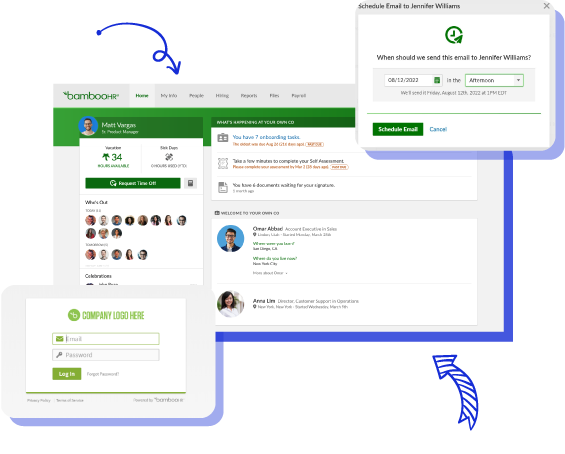
BambooHR employee self-service allows employees to securely access and, where permitted, update their own HR information without relying on an administrator for every request.

Depending on their permissions, assigned features, and the organization’s BambooHR configuration, employees may be able to:
- View personal information and employment details.
- Update contact information and other approved profile fields.
- Check available time-off balances.
- Submit vacation or leave requests.
- Access a company directory.
- Complete assigned onboarding tasks.
- Review documents and complete electronic signatures.
- Access supported HR features through the BambooHR mobile app.
The objective is to make routine HR information and actions available to the people who need them while maintaining appropriate controls over sensitive employee data.
For organizations using BambooHR as their central HR information system, employee self-service is an important part of improving day-to-day HR operations.
Why Employee Self-Service Matters for HR Teams
HR departments often manage recurring administrative requests, from updating addresses to checking leave balances and confirming employee details. When every request requires manual intervention, relatively simple tasks can interrupt more important HR responsibilities.
Reduces repetitive administrative work
Employees can handle permitted profile updates and routine requests themselves. HR teams can spend less time transferring information between emails, spreadsheets, and employee records.
Gives employees easier access to information
Employees have a central place to check their information and available HR resources rather than relying on individual emails or shared documents.
Supports more consistent employee records
When employees can review their information and request corrections, HR teams have additional opportunities to identify outdated or inaccurate records.
Makes approval processes easier to manage
Time-off requests and certain information changes can follow defined approval workflows, helping managers and HR administrators manage requests more consistently.
However, these benefits depend on configuring the system correctly. Providing broad access without reviewing permissions can create privacy risks, while restrictive settings can prevent employees from using the features they need.
How to Set Up Employee Self-Service in BambooHR
To set up BambooHR employee self-service, review employee records, configure access levels, assign the necessary permissions, enable the relevant HR workflows, invite employees, and test the experience before rollout.
The following process provides a practical starting point for HR administrators.
Step 1: Review Employee Information Before Enabling Access
Start by reviewing the employee information already stored in BambooHR. Self-service is only useful when employees can access reliable information associated with the correct profile.
Check the following:
- Employee names and contact information.
- Work email addresses and available personal email information.
- Departments and job titles.
- Reporting relationships.
- Employment status.
- Location and organizational assignments.
- Applicable time-off policies.
Identify missing, outdated, or incorrectly assigned information before distributing access invitations. For example, if an employee is assigned to the wrong department or manager, it may affect reporting relationships and the way certain approval processes operate.
This is also a good opportunity to review how employee information is organized across standard and custom fields. For more detailed configuration guidance, see our guide to employee profiles and custom fields in BambooHR.
Step 2: Configure BambooHR Employee Access Levels
BambooHR uses access levels to control what users can see and do within the system. These permissions are particularly important because an HRIS may contain compensation details, personal contact information, employment records, and other sensitive information.
For a typical implementation, organizations need to distinguish between employee, manager, and administrative responsibilities.
| Access level | Typical purpose |
|---|---|
| Employee | Access permitted personal information and self-service features |
| Manager | Access authorized team information and perform assigned management tasks |
| Administrator | Manage employee information, system configuration, and authorized administrative functions |
| Custom access level | Provide a tailored combination of permissions for a specific role or group |
In BambooHR, authorized administrators can review access levels through the account settings. The configuration interface may vary by account and product updates, but the general process involves:
- Open the account’s access-level settings.
- Review the existing employee and manager access levels.
- Check which employee fields each group can view.
- Decide which information employees may edit.
- Determine whether changes require approval.
- Save and test the relevant settings.
Avoid giving employees administrative access simply to make self-service features available.
Best practice: Follow the principle of least privilege. Employees should receive the access necessary to complete their responsibilities without unnecessary exposure to other people’s sensitive information.
BambooHR also supports more granular access configurations, although the available controls may depend on your account and subscribed features.
Step 3: Decide Which Employee Information Can Be Edited
One of the most important BambooHR self-service decisions is determining which employee profile fields are view-only and which can be updated. Not every field should have the same permissions.
For example, an organization might allow employees to update their phone numbers while requiring approval for changes to other personal information.
| Employee information | Suggested configuration |
|---|---|
| Personal phone number | Employee can request or make updates |
| Home address | Employee edit or approval-based update |
| Job title | View-only for employees |
| Department | View-only for employees |
| Reporting manager | View-only for employees |
| Compensation details | Restricted according to role and company policy |
| Employment status | HR-controlled |
These are recommended policy examples, not mandatory BambooHR defaults. Where available, BambooHR field permissions can distinguish between viewing information, editing it, and submitting changes for approval.
Before enabling access, decide which team or role is responsible for reviewing changes that require approval.
Step 4: Configure Time-Off Self-Service
Time-off management is one of the most practical employee self-service functions in BambooHR. When correctly configured, employees can review their available balances and submit time-off requests without requiring HR to enter every request manually.
Before introducing this functionality, confirm that:
- Appropriate time-off policies have been created.
- Employees are assigned to the correct policies.
- Relevant balances and accrual rules are accurate.
- Approval responsibilities are configured.
- Employee access levels permit the necessary time-off actions.
An employee’s assignment to a time-off policy does not automatically guarantee that they can view their balance or submit a request.
BambooHR has documented permission warnings that help administrators identify conflicts between time-off policy assignments and employee access settings. For that reason, test both the visibility of time-off balances and the ability to submit requests.
For teams with multiple locations or different leave policies, test representative employees from each policy group.
Step 5: Enable Access to Relevant Employee Resources
Employee self-service can extend beyond personal information and leave requests.
Depending on the BambooHR features enabled for your organization, employees may also access:
- Company directory information.
- Assigned onboarding tasks.
- Company announcements or resources.
- Documents requiring acknowledgment or electronic signatures.
- Performance-related activities.
- Supported mobile HR features.
Choose features based on actual employee needs rather than making every available function part of the initial rollout.
For example, organizations with a large number of new hires may prioritize onboarding tasks and employee documents, while established teams may initially focus on time-off requests and maintaining employee information.
Make sure shared company resources do not accidentally expose confidential personnel information.
Step 6: Invite Employees and Verify Their Access
After preparing the system and reviewing permissions, employees need a way to activate or access their BambooHR accounts. Use the account’s supported employee invitation or access-management process.
Before inviting employees, confirm their email addresses and review whether the organization uses BambooHR login credentials or an approved single sign-on arrangement.
When employees receive account invitations, provide simple instructions explaining:
- Where to access the BambooHR login page.
- How to activate their account.
- How to complete any required authentication steps.
- Where to find personal information.
- How to request time off.
- Who to contact if they experience access problems.
For employees using mobile devices, introduce the BambooHR mobile app and explain which features are available to their accounts. The app supports a range of employee actions, but individual capabilities depend on the organization’s enabled features and permissions.
Avoid assuming that every employee will see the same menus or functions.
Test BambooHR Employee Self-Service Before Company-Wide Rollout
A common implementation mistake is configuring employee access and immediately inviting the entire workforce without testing the experience. Instead, select a small group of users representing different employee roles and departments.
Ask them to complete routine tasks using their actual employee permissions.
Employee Self-Service Testing Checklist
- Employee can successfully access BambooHR.
- Employee can view the appropriate personal profile details.
- Restricted information is not visible.
- Permitted profile updates work as intended.
- Changes requiring approval follow the correct workflow.
- Available time-off balances display correctly.
- Employee can submit a time-off request where authorized.
- Requests reach the appropriate manager or approver.
- Employee can access approved company resources.
- Mobile access works for relevant employee functions.
Where supported, administrators can use BambooHR’s access-preview functionality to inspect what a user is permitted to see. However, previewing permissions should complement—not replace—testing with actual employee accounts.
Document any issues and correct them before expanding access.
Common BambooHR Employee Self-Service Setup Mistakes
Giving employees more access than they need
Broad permissions can expose information that should remain restricted. Review viewing and editing permissions separately, particularly for compensation, employment status, and confidential employee fields.
Forgetting to configure approval workflows
Allowing an employee to request a change is different from determining who approves it. Make sure approval responsibilities reflect the organization’s actual management structure.
Overlooking time-off permissions
Employees may be assigned to a time-off policy but still lack the permissions needed to view balances or submit requests. Test the employee experience after assigning policies.
Sending invitations before verifying employee data
Incorrect email addresses, manager assignments, or employment records can create confusion during account activation. Complete a data-quality review before sending invitations.
Skipping employee training
Employees who have access to self-service may still contact HR for routine requests if they do not understand how to use it. A short introduction and task-based instructions can help.
How to Train Employees to Use BambooHR Self-Service
Employee training does not need to cover every BambooHR feature at once. Focus first on the activities employees are most likely to perform.
A practical introductory session can cover:
Account access: How to log in and troubleshoot common access problems.
Personal information: Where to find profile information and how to request or make permitted updates.
Time off: How to view balances, submit requests, and check their status.
Company resources: Where to find permitted directories, policies, documents, and onboarding materials.
Mobile access: How to install the supported mobile application and use relevant functions.
Prepare simple written instructions that employees can revisit after the initial session. HR teams should also explain when employees should contact an administrator instead of making a change independently.
How to Measure Employee Self-Service Adoption
After rollout, monitor whether employees are successfully using the functions introduced. Rather than measuring success only by the number of activated accounts, look at the practical impact on daily HR activities.
Useful indicators include:
- Percentage of invited employees who activate their accounts.
- Number of employees using approved self-service functions.
- Volume of routine HR requests that still require manual intervention.
- Frequency of login or permission-related support requests.
- Time required to review and approve requests.
- Employee feedback about navigation and usability.
The availability of these measurements within BambooHR depends on the account’s reporting functionality. Some metrics may need to be tracked through internal support records or other business systems.
Use the findings to improve training materials, permissions, and approval processes.
When to Get Help With BambooHR Self-Service Configuration
For a small organization with straightforward permissions, self-service configuration may be relatively simple. More complex environments require additional planning.
You may benefit from professional implementation support when:
- Different departments require different access levels.
- Employees work across multiple locations or countries.
- The organization has complex time-off policies.
- Employee data needs cleanup or restructuring.
- Existing approval workflows are inconsistent.
- Several HR processes need to be coordinated.
- The HR team is unsure how to configure sensitive data permissions.
An implementation partner can help evaluate existing processes, document access requirements, configure supported workflows, and prepare employees for adoption.
If your organization is still building its BambooHR environment, start with our BambooHR setup and HRIS implementation guide for a broader overview of the implementation process.
You can also explore our BambooHR first 30 days onboarding roadmap for guidance on introducing the system to your HR team.
Frequently Asked Questions About BambooHR Employee Self-Service
What is BambooHR employee self-service?
BambooHR employee self-service lets employees access their permitted HR information and complete supported tasks, such as updating personal details and requesting time off, without relying on HR for every action.
How do I give an employee access to BambooHR?
An authorized administrator can manage an employee’s access through BambooHR’s employee access or account settings. Confirm the employee’s information, assign appropriate permissions, and use the supported account invitation process.
Can employees update their personal information in BambooHR?
Yes, if their access level allows it. Administrators can control which information employees can view, edit, or submit for approval.
Can employees request time off through BambooHR?
Yes. Employees can request time off when the relevant policies and access permissions are correctly configured.
Can employees use BambooHR on their phones?
Yes. BambooHR provides a mobile application for supported employee activities. Available features depend on the organization’s subscription and individual access permissions.
Can employees see other employees’ information?
Employees may access approved directory information or other records their permissions allow. Sensitive information should remain restricted through appropriate access settings.
Why can’t an employee request time off in BambooHR?
Possible causes include missing access permissions, an incorrect time-off policy assignment, or incomplete configuration. Check the employee’s policy and access level before troubleshooting further.
Set Up BambooHR Employee Self-Service With Confidence
Employee self-service works best when access permissions, employee information, and everyday HR workflows are configured together.
Begin by reviewing employee records and deciding what employees need to see or change. Configure access levels, prepare time-off and approval settings, test the experience, and give employees practical training before a broader rollout.
Hire Elite Consultants can help businesses plan and configure BambooHR workflows that support their HR operations.
Whether you’re preparing a new implementation or improving an existing environment, a structured approach can make employee self-service more useful for your team.
Need help configuring BambooHR? Contact Hire Elite Consultants to discuss your HRIS implementation and employee access requirements.