Internal collaboration often breaks down when teams juggle too many tools, scattered updates, and siloed information. As more businesses manage remote and hybrid teams, the ability to work in sync is critical. The combination of Slack, Notion, and Google Workspace offers a powerful stack for keeping communication, documentation, and file management unified.
But simply using these tools isn’t enough. To get the most out of them, you need an intentional system that reduces noise, ensures clarity, and accelerates action.
Why These Tools Are a Winning Trio for Collaboration?

Slack enables real-time communication, Notion organizes project details and documentation, and Google Workspace manages documents, calendars, and shared files. Together, they offer a complete solution for team operations.
When configured properly, this trio eliminates the need for context-switching. Teams know where to talk, where to find project updates, and where to store or review documents.
How to Use Slack to Improve Communication?
Slack is ideal for fast updates, quick decisions, and maintaining project momentum. Without structure, though, it quickly becomes cluttered. The key is to organize it by purpose.
Create Focused Channels
Set up Slack channels dedicated to specific clients or projects. Instead of vague threads like #marketing, go with names like #client-acme or #project-website-redesign. This ensures that messages stay relevant and easy to find.
Bring in Useful Notifications
Slack works best when it delivers key information from other platforms. Use integrations to receive calendar reminders, CRM updates, or task changes. This way, team members receive critical updates without having to check multiple apps.
Use Clips and Huddles Wisely
Not every discussion needs a meeting. Slack clips allow team members to record short videos or audio messages, while huddles offer instant voice chat. These tools are perfect for async updates, daily standups, or clarifying a quick question without booking a Zoom call.
Using Notion to Manage Project Details and Knowledge
Slack handles fast communication, but Notion stores your long-term memory. It keeps projects organized, ensures accountability, and helps teams avoid duplicated effort.
Build Project Templates
Create templates for every client or project that include sections for goals, key contacts, timelines, and deliverables. Having a consistent structure reduces confusion and ensures nothing gets missed, especially during handoffs.
Track Status with Synced Databases
Use Notion databases to monitor project progress. Columns can include status updates, due dates, assigned team members, and notes. With a shared view, everyone stays on the same page, and updates are reflected in real time.
Centralize Resources
Embed shared calendars, Google Docs, editorial briefs, or brand guidelines directly into Notion. Keeping everything in one place reduces unnecessary back-and-forth and helps team members locate the resources they need instantly.
Organizing Google Workspace for Document and Calendar Management
Google Workspace provides the backbone for file storage and collaborative editing. However, without structure, it can become a chaotic mess of untitled documents and lost folders.
Use Consistent Folder Naming
Establish naming conventions for Drive folders, such as Clients > Acme > Web Redesign > Assets. This makes it easier to onboard new teammates and ensures everyone knows where to save and retrieve files.
Share Drives for Team or Client Access
Instead of relying on personal Drives, create Shared Drives for each client or project team. This improves visibility, maintains continuity when team members leave, and keeps permissions manageable and organized.
Streamline Approvals and Reviews
Google Docs and Sheets make it easy to leave comments, suggest edits, and assign follow-up actions. Encourage the use of @mentions to ensure reviewers are notified and stay informed. This speeds up reviews and avoids missed feedback.
How to Connect Slack, Notion, and Google Workspace?
The real power of these tools emerges when they are linked together. You can eliminate duplicate data entry, missed updates, and disjointed workflows by integrating them.
Use Zapier for Automation
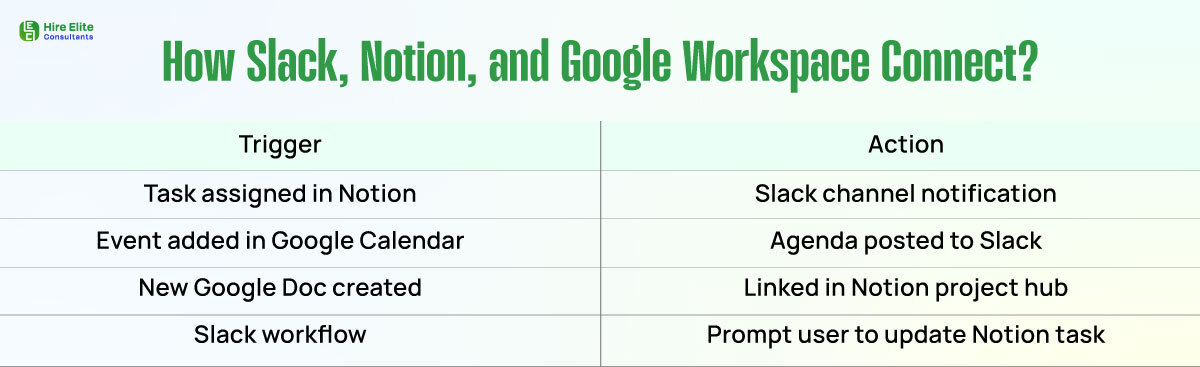
Zapier enables you to set up automated actions between various tools. For example, when a new task is assigned in Notion, you can trigger a Slack message to notify the team. Similarly, when a new event is added to Google Calendar, you can automatically post the agenda in a Slack channel.
Leverage Native Slack Bots
Notion and Google Drive offer Slack integrations that let you search, share, and preview files without leaving the chat. You can also get automatic Slack notifications when someone edits or comments on a Google Doc.
Slack workflows can also prompt users to update Notion tasks or documents after a meeting has taken place. This ensures that information remains current and aligned across all platforms.
Tips to Keep Collaboration Clean and Effective
To prevent chaos from creeping back in, establish systems that foster long-term clarity. Conduct regular audits of your Slack channels and Drive folders. Archive outdated materials to maintain a tidy workspace.
Apply consistent naming conventions across all tools. Assign workspace owners who are responsible for maintaining project templates, folder structures, and integration updates.
Avoid over-automation. Too many notifications can overwhelm your team. Select key workflows to automate, and let the rest remain manual yet purposeful.
Finally, offer short onboarding docs or Loom videos to train team members on how to use your collaboration stack effectively.
Build Smarter Systems, Not More Tools
Your team doesn’t need another app. It needs a smarter system. By optimizing the integration of Slack, Notion, and Google Workspace, you can create a seamless flow of communication, documentation, and execution.
When each tool has a clear purpose, and they all work in harmony, you reduce distractions, improve handoffs, and give your team space to focus on meaningful work. Create clarity, reduce silos, and deliver better results, but one integrated workflow at a time.